

Table of Contents
- Why Graphic T-Shirt Prints Crack in the First Place
- How to Wash Screen Printed Shirts Without Damaging the Design
- Air Drying vs. Machine Drying Graphic Shirts
- Ironing and Heat Press Safety for Graphic T-Shirt Prints
- How to Store Graphic Tees to Keep Prints Intact
- How to Fix a Cracked Screen Print
- Frequently Asked Questions
Last Updated: September 2, 2026
Why Graphic T-Shirt Prints Crack in the First Place
Prints crack when the ink layer loses its bond with fabric fibers. That bond breaks down through repeated heat exposure, mechanical agitation, and chemical stress from detergents, factors mostly within your control.
At Greatuncledad, we design every graphic tee with print longevity in mind, but even the best-printed shirt needs proper care to hold up over time. Below, we cover why prints fail, how to wash and dry screen printed shirts correctly, how to store them, and what to do if cracking has already started.
Plastisol Ink vs. Direct-to-Garment Printing
Plastisol ink is a PVC-based ink that sits on top of the fabric, creating a raised, slightly rubbery print surface. The ink curing process requires precise heat press temperatures to fuse permanently to the fabric. Under-cured plastisol cracks almost immediately with washing; properly cured plastisol lasts for years with correct care.
Direct-to-garment (DTG) printing sprays water-based ink directly into fabric fibers, producing softer, more detailed prints. Because the ink bonds within the fiber rather than on top of it, DTG prints are generally more flexible and less prone to surface cracking. They can, however, fade faster if washed in hot water or with harsh detergents.
According to Textile World's guide to garment printing technologies, heat adhesion quality during the curing phase is the single biggest predictor of long-term print durability, regardless of ink type.
How Fabric Elasticity Affects the Print
The fabric underneath a print is not static. Cotton stretches when you pull it on and off, when you wash it, and when it tumbles in a dryer. That constant movement puts mechanical stress on the ink layer. If the ink cures into a rigid film but the fabric beneath stretches frequently, micro-cracks form along the design edges first, then spread inward.
Higher-elasticity fabrics like cotton-polyester blends stretch more than 100% ring-spun cotton. Pure cotton shirts offer a more stable base for printed designs because the fabric moves less with each wear and wash cycle.

How to Wash Screen Printed Shirts Without Damaging the Design
The washing machine is where most prints deteriorate, not through one catastrophic wash, but through accumulated damage from heat, friction, and harsh chemistry.
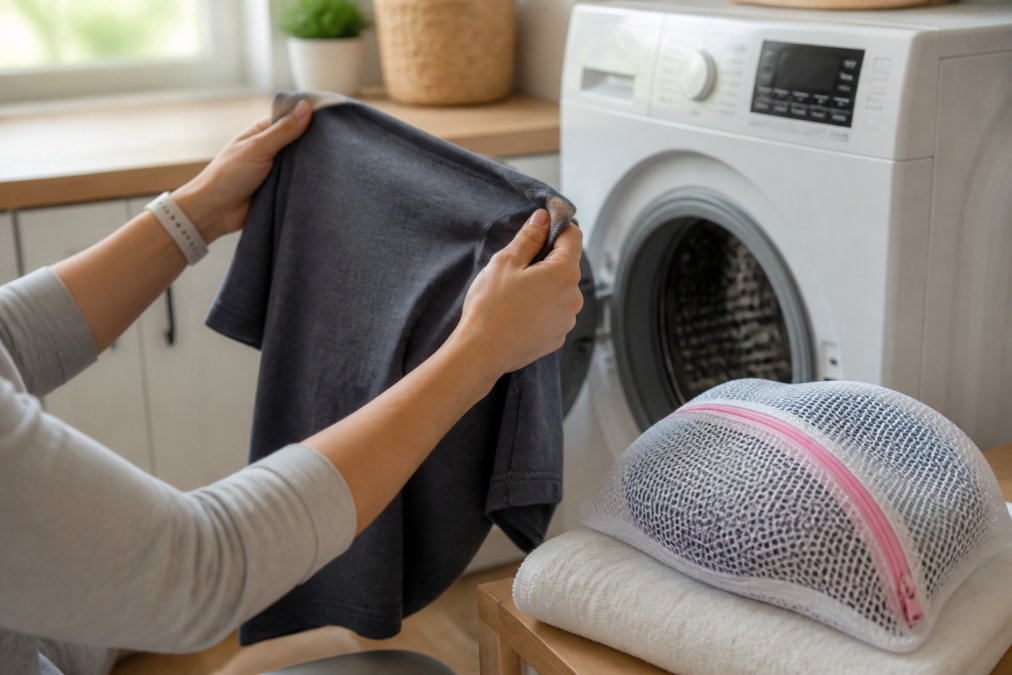
Follow these steps every time you wash a graphic tee:
- Turn the shirt inside out before washing
- Place it inside a mesh laundry bag to reduce friction against other garments
- Select cold water and the delicate cycle
- Use a mild, bleach-free detergent in the recommended amount
- Avoid fabric softeners with the first wash, as they can interfere with ink adhesion on newer prints
- Remove the shirt promptly when the cycle ends to avoid moisture stress on the ink
Turn the Shirt Inside Out Before Every Wash
Turning a graphic shirt inside out before washing is the single easiest thing you can do, and it is the step most people skip.
The print faces the inside of the drum when reversed. Instead of the ink surface rubbing directly against other garments and the drum wall, the fabric backing takes the friction. Over dozens of washes, that difference is significant. Prints that go in face-out experience surface abrasion that gradually dulls colors and weakens the ink film.
Cold Water and the Delicate Cycle
Hot water is the enemy of graphic t-shirt prints. Heat causes the ink layer to expand and contract, accelerating cracking in plastisol prints and fading in DTG prints. Cold water, typically at or below 30°C (86°F), keeps the ink film stable during washing.
The delicate cycle uses gentler, slower movement that produces far less mechanical stress on the print surface than a standard wash cycle. Combined with cold water, it is the lowest-impact wash setting available on most machines.
According to the American Cleaning Institute's fabric care guide, cold water washing significantly reduces wear on specialty fabrics and applied finishes.
Choosing the Right Detergent
Standard laundry detergents often contain optical brighteners, enzymes, and bleaching agents that attack dyes and ink films. For graphic tees, use a mild detergent without bleach or optical brighteners. Many liquid detergents marketed for dark or color-safe laundry fit this description.
Using too much detergent leaves a film on the fabric that builds up over multiple washes, creating a layer between the ink and air that can cause the print to appear dull and eventually crack. Use the minimum recommended amount.
Air Drying vs. Machine Drying Graphic Shirts
Air drying wins. There is no close second.
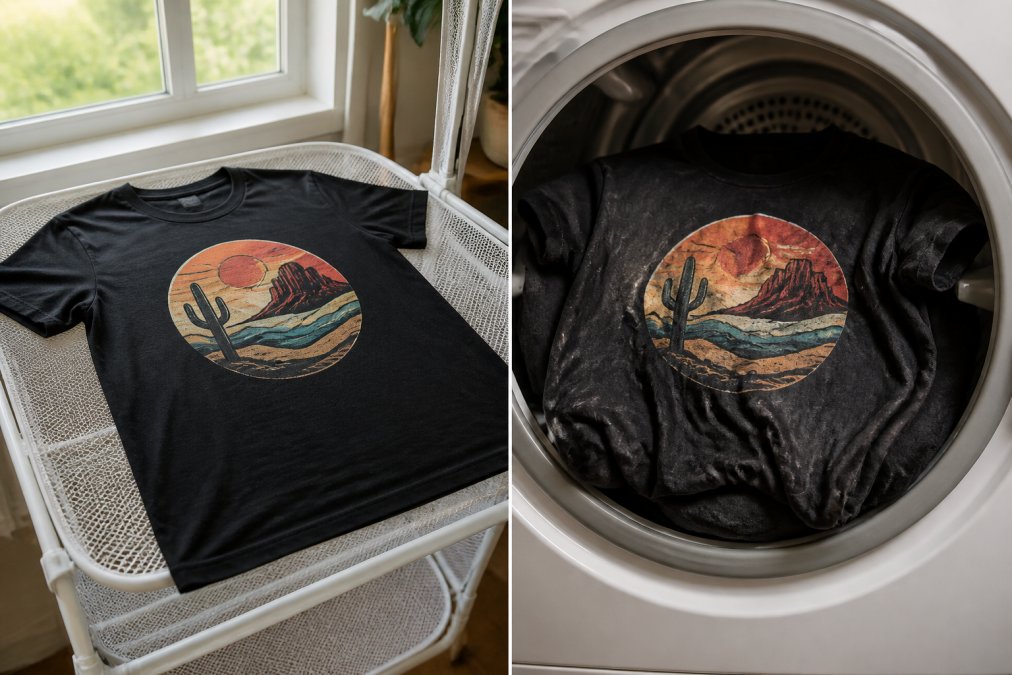
The tumble dry cycle exposes your shirt to sustained heat, which is the primary driver of ink cracking and peeling. The drum tumbling also creates friction as the shirt folds and unfolds repeatedly at high speed. For plastisol prints especially, this combination accelerates cracking faster than almost anything else in the laundry process.
Air drying eliminates both problems. Lay the shirt flat on a clean surface or hang it on a drying rack away from direct UV exposure. An indoor rack near a window (rather than outside in full sun) is the better option, especially for DTG prints.
| Method | Heat Exposure | Friction | Risk to Print | Recommended? |
|---|---|---|---|---|
| Air dry (flat) | None | None | Very low | Yes |
| Air dry (hanging) | None | Minimal | Low | Yes |
| Tumble dry (low heat) | Moderate | Moderate | Medium | Avoid if possible |
| Tumble dry (high heat) | High | High | Very high | No |
If you must use a dryer, select the lowest heat setting and remove the shirt while still slightly damp. Never tumble dry on high heat.
Ironing and Heat Press Safety for Graphic T-Shirt Prints
Direct iron contact on a plastisol print melts the ink, creating a shiny, distorted mess that cannot be fixed. DTG prints suffer color damage and texture changes under direct heat.
The correct approach:
- Turn the shirt inside out before ironing
- Place parchment paper between the iron and the print area if you need to iron over it
- Set the iron to a low or medium setting, never high
- Do not use steam directly on the print area
- Iron around the design where possible rather than over it
If you own a heat press and want to refresh a slightly peeling print, parchment paper is again your best tool. Apply low heat for a short duration and check frequently. A heat press can re-adhere minor lifting edges on plastisol prints, but it is not a cure for significant cracking.
According to the Craft Industry Alliance's guide to heat transfer and garment care, applying heat press temperatures above the ink's original curing threshold without protective sheeting is the most common cause of irreversible print damage during home care.
How to Store Graphic Tees to Keep Prints Intact
How you store a graphic tee between wears has a real cumulative effect on print longevity. The two main threats during storage are moisture and physical pressure.
Moisture creates conditions where the ink film can soften and lose adhesion over time. Never store a graphic tee while it is still damp.
Physical pressure from tight stacking can cause plastisol prints to stick to adjacent fabric, especially in warm storage environments. When the shirts are pulled apart, the ink surface can tear or crack along the design edges.
Best storage practices for graphic tees:
- Fold printed shirts with the design facing outward when stacking, so the ink surface is not pressed directly against another fabric
- Alternatively, hang graphic tees on wide hangers to avoid fold lines across the print
- Store away from direct sunlight, which causes UV fading over time
- Keep storage areas dry
- Do not compress graphic tees at the bottom of a heavy stack for extended periods
The Patriotic Faith USA 250th Anniversary Commemorative T-Shirt and similar DTG-printed designs benefit especially from hanging storage, since water-based inks are more sensitive to sustained compression than plastisol.

How to Fix a Cracked Screen Print
Significant cracking cannot be fully reversed. The goal is stopping further deterioration and making the shirt wearable again.
For minor surface cracking on plastisol prints:
- Turn the shirt inside out
- Place parchment paper over the print area (from the inside)
- Apply a heat press or household iron on a low-medium setting for 10-15 seconds
- Allow to cool completely before checking
- Repeat once if needed
The heat reactivates the plastisol slightly, which can close hairline cracks and re-adhere lightly lifted edges. This works best on cracks less than a few millimeters wide that have not yet peeled away from the fabric entirely.
For peeling edges specifically:
Fabric glue designed for heat-set application can be used carefully along peeling edges. Apply a thin layer, press with parchment paper and an iron, and allow to cure fully.
What does not work:
- Standard craft glue or super glue (too rigid, cracks immediately with fabric movement)
- Ironing directly on the cracked print (causes further damage)
- Washing in hot water to "reset" the ink (accelerates cracking instead)
The most effective fix for a cracked print is prevention. Proper washing, drying, and storage practices from the first wear protect your shirt for years rather than months.
| Care Step | Action | Frequency |
|---|---|---|
| Pre-wash prep | Turn inside out, use mesh bag | Every wash |
| Water temperature | Cold water only | Every wash |
| Cycle selection | Delicate cycle | Every wash |
| Detergent | Mild, bleach-free | Every wash |
| Drying | Air dry flat or on rack | Every wash |
| Ironing | Inside out, parchment paper | As needed |
| Storage | Hang or fold print-side out | Always |
Keeping graphic t-shirt prints in good shape requires consistent habits. The washing machine and dryer do the most damage, and both are easy to manage with the right settings. Greatuncledad backs every tee with a quality guarantee, and our 24/7 email support team is available if you have questions about caring for your specific design. Browse the full collection and find a shirt worth protecting.
Frequently Asked Questions
Why do graphics on shirts crack over time?
Graphic prints crack because repeated washing, heat, and friction break down the bond between the ink and the fabric. Plastisol ink and direct-to-garment prints both rely on heat adhesion to fuse to the fibers. Hot water, tumble drying, and harsh detergents accelerate that breakdown by expanding the fabric repeatedly and leaving detergent residue that stiffens the ink layer. Fabric elasticity also plays a role, stretchy materials flex more with each wear and wash, stressing the ink until it peels or cracks.
What is the best way to wash graphic tees to prevent damage?
Turn the shirt inside out, place it in a mesh laundry bag, and run a cold water wash on the delicate cycle. Use a mild, bleach-free detergent and avoid fabric softeners, which coat fibers and weaken ink adhesion over time. These steps together do more to extend garment care and textile longevity than any single change on its own.
Does using a dryer cause graphic prints to crack?
Yes. Tumble dry heat is one of the fastest ways to degrade screen printing. The thermal stress from repeated dryer cycles causes the ink to expand and contract, weakening the cured ink layer until it cracks or peels. Air drying flat or on a hanger eliminates that thermal stress entirely. If you must use a dryer, select the lowest heat setting and remove the shirt while it is still slightly damp to reduce total heat exposure.
Can you actually fix a cracked screen print at home?
Minor cracking can be improved but rarely restored to factory condition at home. Fabric paint or a heat-activated textile medium applied carefully over the cracked area and sealed with parchment paper under a household iron can stabilize the damage and reduce visible cracking. Acetone is sometimes suggested online, but it can dissolve the surrounding ink and damage the fabric, so it is not recommended. Prevention remains far more effective than any repair technique.
This article was written using GrandRanker
